Message requests on networks like Instagram and X will now show up in a dedicated Requests folder, keeping all the spam at bay.
X Chat
Full X Chat support is rolling out soon to a Beeper near you. This brings support for full end-to-end encrypted chats after you’ve entered your PIN.
Telegram Topics Toggle
Big Telegram groups user? You can now have topics from groups show up as separate spaces, just enable the toggle in Preferences → General.
Beeper Browser Extension
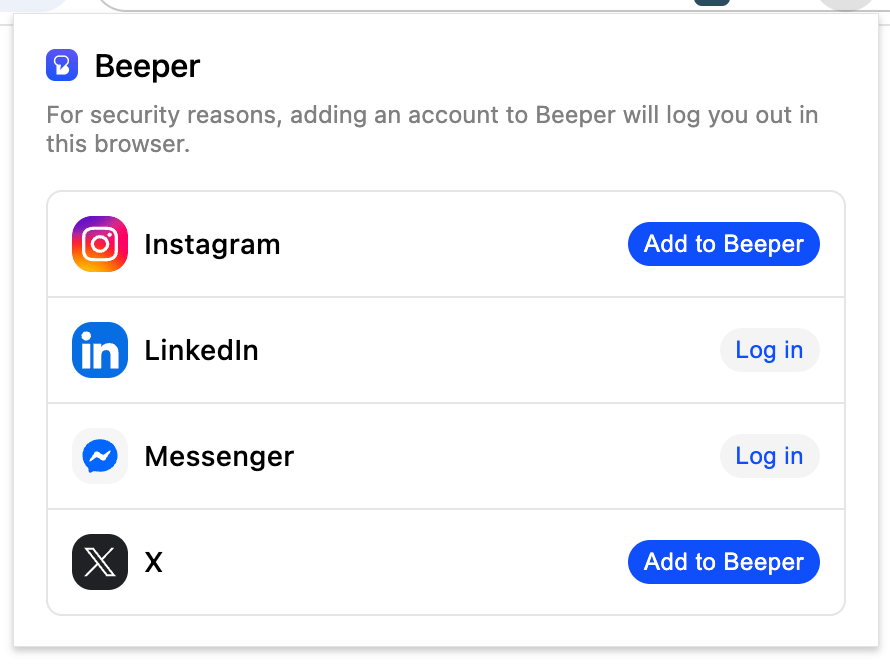
Having trouble logging in to an account? We built a backup option for you to login on Beeper right from your browser by securely transferring your browser’s existing login session to Beeper. Currently supports Instagram, Messenger, LinkedIn, and X.
Long awaited, you can finally create group chats right from Beeper. More features like add/remove members to come soon.
Invoke AI in Chats
Rolling out as an experimental feature on Beeper Desktop, you can invoke some GPT models (and Apple Intelligence on macOS Tahoe) right within Beeper and ask them anything. Messages will be visible to all members in the chat and the AI response will send from your device.
Labels
Beeper can get noisy when chats from every part of your life streams into one inbox. Rolling out on Beeper iOS and Android first, with labels, you can segment your life and better organize your chats, optionally hiding them from the main view, or simply tag certain people with a label.
That’s all! These features may take a little while to roll out to everyone, so stay tuned.
Delete chat for yourself on WhatsApp, Instagram, Messenger, Telegram, X, LinkedIn, Google Voice, Google Messages, Signal (support for some networks rolling out soon) and for you and the recipient on Telegram. As always, everything stays in syncs with the native network.
Parity: Disappearing messages
Disappearing messages now have indicators for each message on networks that support them. You can also adjust the timer from Chat Info.
iOS stability
We’ve made some major engineering improvements to increase stability and reduce the crashes to near zero. TestFlight users will especially notice this as the app often crashed in the background with a crash prompt. For everyone else, this means Beeper opens will be faster in many cases.
iOS 26 tweaks
Beeper now feels right at home on iOS 26, with UX tweaks that make it blend seamlessly with the latest design language.
At Beeper, our mission is simple: chat with anyone, on any network, from a single app.
Today, Beeper already connects to WhatsApp, Instagram, Telegram, Google Messages, Google Chat, Google Voice, Messenger, Signal, LinkedIn, X, Discord, and Slack.
But that’s not enough, to truly make Beeper the app for all your messages, we need to bridge even more networks.
As a small team, building and maintaining bridges takes a lot of time and effort. We also know that our community is full of talented developers who want to help make Beeper even better.
That’s why we want to make it easy for you by offering bounties for new bridges and our support in development.
Google Voice Beeper is adding a new network to our list of supported apps after quite some time: Google Voice – available on Beeper On-Device, joining Google Messages and Google Chat in the growing family of supported Google messaging apps.
LinkedIn on Beeper On-Device Previously Beeper Cloud–only, LinkedIn can now be added as a Beeper On-Device connection. This means you can connect multiple LinkedIn accounts (with Beeper Plus) while keeping your chats stored securely on your device.
Parity: Typing indicators Continuing our Parity work in August, Beeper now has bidirectional typing indicators support for Google Messages and Instagram (Beeper On-Device only.) You’ll see when your friends are typing and they’ll see when you are, too.
Parity: Custom emojis in Telegram messages Custom emojis in Telegram messages now display exactly as intended, fully animated, so you can see every expressive detail.
Don’t mark as read after archive If you’re an inbox-zero workflow user, you probably don’t want to respond to every person, but also don’t want to send them a read receipt for a chat you haven’t read, when you archive. Now you can – in Beeper settings, just toggle this switch:
“Expressive Colors” uses Google’s new M3 Expressive color system from 2025
“High Contrast” increases distinction between colors for readability
“Pure Black” will take background colors that are close to black and make them actually black, which should be kinder to your battery if you’ve got an OLED screen
Last year, after Beeper was acquired by Automattic, we decided that we needed to dramatically improve our iOS experience. The previous Beeper iOS app was slow, buggy, and hard to add new features to. Additionally, we knew we wanted to support On-Device connections, which would require the app to be rebuilt anyway to match the architecture we implemented with our new Beeper Android app. We built a team out of the engineers that were working on the early version of a Texts iOS app as well as the Beeper iOS team and got to work.
One of the biggest challenges in building a great iOS experience is the strict limitations Apple places on app developers. Unlike Android, iOS apps aren’t allowed to run in the background for long periods, presumably to preserve battery life. Our app needs to do two main things in the background. The first is to sync your chats so that when you open the app, all your messages are already there and you don’t have to wait for us to reach out to each of the networks to get your latest messages. The second, and more importantly, we need to show notifications when you receive a new message. Notifications are especially difficult because of our privacy-first architecture: our servers can’t read your messages, they can only tell you that some new encrypted payload has arrived, and the only thing that has the keys to actually decrypt the message content to show you is the app running on your phone.
Apple has anticipated this problem and provides a mechanism called the UNNotificationServiceExtension (NSE). This API allows you to run a second process in conjunction with your main application that can only process notifications. Importantly, this is a completely separate process: it cannot share in-memory state with your main app, has a different lifecycle, and may run independently or even simultaneously with your main app. This is quite different from Android, where push notifications trigger Intents that wake up your main application to give you full access to all your application state and functionality in the background.
We’ve used this NSE mechanism on iOS to implement notifications for both our cloud connections and our new On-Device connections. For cloud connections, your accounts are always being synced by our backend and stored as Matrix events, leveraging Matrix’s encrypted architecture to preserve privacy. When we receive a message we think you should be notified for, we send a push notification to the application. The NSE receives this notification, and if the main application currently isn’t in the foreground, it takes over and processes the notification, including doing additional key fetches as necessary to decrypt the notification.
For On-Device connections, the implementation is slightly more complicated. Since our backend doesn’t have the ability to receive your messages, we need a different way of being notified when there might be a new message received on one of your networks. To implement this, we’ve implemented what the original clients use to be woken up by their own backends, and registered for those same pushes. This method preserves privacy, as we’re only seeing the push content that the networks are already sharing with Apple and Google in order to use their push notification networks. Our backend registers for these pushes (as our backend is the only thing that’s always available) and forwards that encrypted content down to our mobile apps in a new push originating from our backend. The NSE will be woken up by this push, and then can do the required processing to show the decrypted notification to the user.
While this approach is complex, it preserves our goals of having real-time notifications for our On-Device connections while preserving equal privacy to the native apps on the network. However, it still does push the boundaries on what’s possible on iOS. One challenge is that we can’t share memory state with the main application, so in order to share state with the main app (such as the database containing the decryption keys), a careful locking design had to be implemented where only the main application or the NSE is allowed to be processing data at once. The bigger issue though is that iOS provides some pretty strict runtime requirements on the NSE. You’re only allowed to run for a small amount of time to process a notification, and you’re only allowed to use a small amount of memory.
We at Beeper have been always using this NSE mechanism to display notifications, even with our original application, and have always struggled with these limitations. At the time, iOS limited memory usage to only 15 MB for most devices, and if you used more memory than that the operating system would kill your NSE, resulting in “blank notifications” where only the app name is shown and not the content (apologies to long-time Beeper users over the years that have experienced this issue). We struggled with this issue when we were only using the NSE with our cloud connections and only had to support one protocol (Matrix), but now with On-Device Connections we need enough memory to support all the protocols we support. The NSE would need to execute Signal key fetching and decrypting for Signal messages and WhatsApp key fetching and decrypting for WhatsApp messages, as it’s the NSE itself now connecting to those networks, not our backend.
Thankfully, regulators are starting to become increasingly interested in the limitations that Apple has been placing on their developers unnecessarily, especially when their own applications are not subject to those same limitations. Thanks to a piece of regulation in the EU named the Digital Markets Act, partly influenced by our Fight For Open, app developers like ourselves can now make requests to Apple to expand what app developers can do on their platform. In early 2024, we made a request for this memory limit to be raised, and over a year later, we got what we asked for.
After updating to the beta, we discovered that they’ve raised the memory limit from 15 MB to 50 MB. While still not a huge amount of memory, it’s enough for our optimized On-Device connections to run and implement all the networks we plan on building. Additionally, it appears that any iPhone that supports Apple Intelligence (iPhone 15 Pro, all iPhone 16 and iPhone 17 models) already had their memory limits increased to 150 MB (and iPads to 250 MB), presumably corresponding to the larger amounts of memory available on those device models.
The relaunch of Beeper iOS represents a new chapter for us: a modern foundation that supports On-Device connections, preserves privacy, and still allows us to provide real-time and reliable notifications. It wasn’t easy, as the iOS platform makes this one of the toughest technical challenges we’ve faced. However, with these improvements in place, we’re excited to keep building toward our vision of a single, secure, and seamless inbox for all your chats.
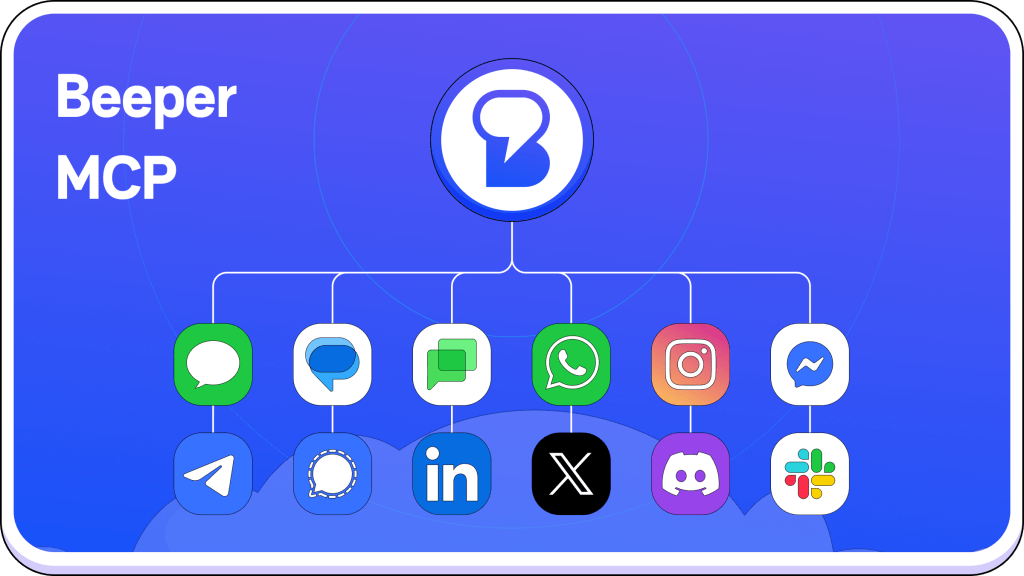
Beeper and friends hosted a MCP hackathon a few weeks ago in our NoHo space where we unveiled our MCP server. Beeper MCP lets you connect Beeper to Claude, Cursor and other AI tools which you can then ask questions like “summarize my latest unread chats” unlocking your chat data.
Beeper MCP is built on the Beeper Desktop API. With this API, you can write scripts and build apps that can read all your chats and send messages across all your accounts. Securely, locally, entirely on your device.
Beeper is working on ensuring parity with the other messaging apps you use so you don’t have to switch to other apps as much. As part of this project, now:
Typing indicators work bidirectionally for WhatsApp, FB Messenger and Telegram (for some networks like WhatsApp, it only works with Beeper On-Device.)
WhatsApp supports previously unsupported messages, including Meta AI messages.
Also, coming soon:
Typing indicator support for more networks.
Indicators for when disappearing messages will disappear.
Rendering of more unknown/unsupported messages.
Rendering of system messages as system instead of user messages.
Beeper is getting a big security upgrade with on-device connections.
Up to now, Beeper has used Beeper Cloud. The Beeper app on your device would connect to Beeper Cloud, which would then connect to the messaging networks. Now, your Beeper app cuts out that middle step, and connects directly to the messaging networks. This means a little extra setup effort for new devices, but it also means that you get end-to-end encryption for all networks that support them.
As a Beeper Cloud user, you don’t have to take any action; everything will continue to work normally as we gradually deprecate it.
Beeper is introducing a set of new premium features as part of the paid Beeper Plus tier, starting at $9.99/month.
Multiple Accounts: add up to 3 accounts from the same network (Beeper On-Device only)
Send Later: schedule messages across any network to send them at hours that make sense
Reminders: get reminded of a chat at any time so that you can follow up, or if you can’t respond when the chat comes in
Incognito Mode: preview chats and messages without sending a read receipt, and respond at your own pace
Voice Note Transcriptions: read voice notes if you’re in a rush (or are somewhere that makes listening difficult)
Custom App Icons: change your Beeper app icon to a couple of fun new ones
10 Total Accounts: add up to 10 accounts (5 more than Beeper Free)
For people who push Beeper to its limits and want even more, Beeper Plus Plus (starting at $49.99/month), will give you unlimited accounts.
As a token of our gratitude for early users, existing Beeper users will get 12 total accounts and Send Later at no cost, and super early Beeper users who paid to skip the waitlist will get all Beeper Plus features indefinitely.
It’s been a while! Since joining Automattic last year and merging with the Texts team, we’ve been building brand-new apps for desktop (on the foundations of the Texts desktop app) and iOS (from scratch.) These new apps are snappy, energy-efficient, and completely redesigned.
We’re hard at work building the best chat app on earth for you. Earlier this year, we released our brand-new Android app, removed our waitlist and opened Beeper up to everyone! Since then, we’ve published a number of Android app features like archive (follow the fun in our Changelog). But we haven’t released many new iOS or Desktop updates. What’s the deal?
New Beeper Desktop and iOS Apps
The deal is that we’re in the process of doing a complete overhaul of our Desktop and iOS apps! We’re rewriting both apps to be fast and beautiful. The new iOS app is being built mostly from the ground up, while the foundation of our new Desktop app comes from the excellent Texts.com app.
Our goal with this rewrite will be to have Beeper clients available on all operating systems, featuring a consistent and beautiful experience. Both new apps will adopt the design language that debuted in the new Beeper Android app. The technical architecture that makes Beeper Android so fast is coming to iOS and Desktop as well! Read more about that on our blog.
Finally, we are continuing to migrate all connections to other chat networks from the cloud to a direct connection inside each app. We released a ‘local’ Signal (vs cloud) bridge in April inside Beeper Android. The new iOS and Desktop apps will feature 100% local bridges, which means that no cloud server is needed to send or receive messages. This will increase the security and privacy for Beeper users, and most likely enable more reliable connections. We’ll also be bringing these local bridges to Beeper Android.
The entire Beeper team is hard at work on this expansive project. We aim to have the first versions ready for testing later this year. In the meantime, expect to see fewer iOS and Desktop app updates as those teams will be exclusively focused on building the new apps.
Alpha Testers Wanted!
We’re looking for some brave friends to join us and help test early versions of these new apps. If you’re open to trying new things, have a keen eye for finding bugs, and willing to take screenshots of issues you spot, please apply to join our Alpha Test group. Unfortunately, we will not be able to accept all applicants at this time.








 Beeper Blog
You must be logged in to post a comment.